Suboptimal client onboarding, notification experience on the Client Portal
Not sure if this where we should be submitting feedback on beta features, but I haven’t heard back from Urvashi on other feedback I sent him, and I wanted to make sure this end-customer feedback landed with y’all. As a former PM at a hyperscaler, I know how immensely valuable direct feedback is from end-customers.
I recently started playing with the client portal and daily logs beta features. They’re okay, but still need some work. I’ll post another feedback item on the issues I’m experiencing with the Daily Logs.
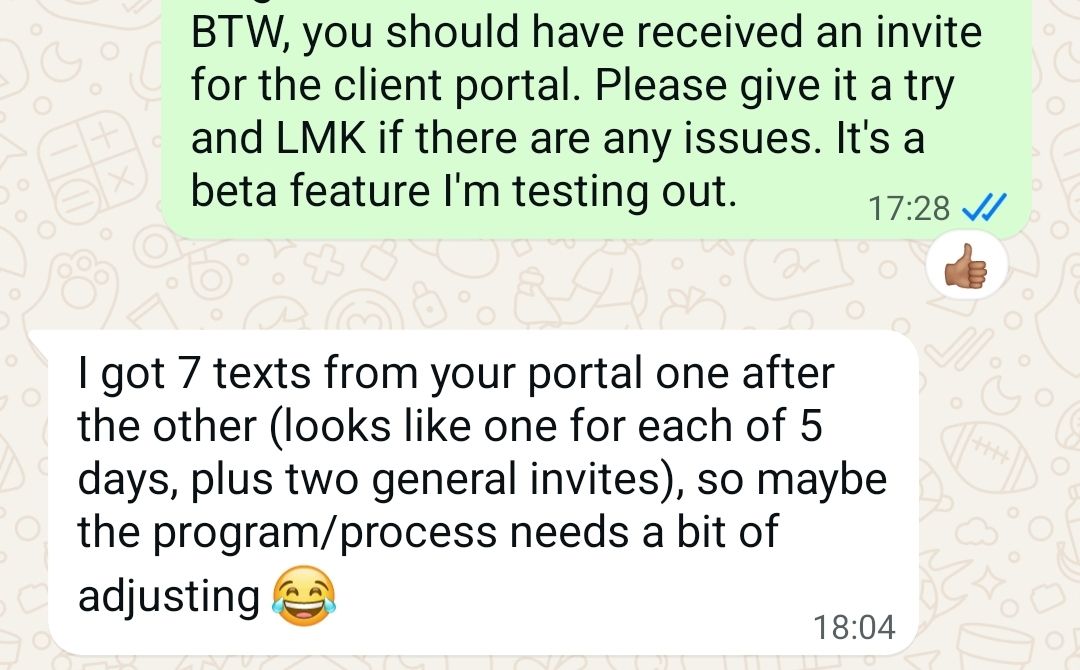
Below is a snap of a thread between me and my client (who also happens to be in software). She’s complaining about the high number of back-to-back text notifications she received AFTER I invited her to the client portal: two general invite messages and 5 messages on daily updates.
How did this happen, you ask? Well, before I invited her to the client portal, I created 5 daily log entries for the previous 5 days because there isn’t much of a point inviting her to an empty portal with nothing to see. I’m assuming that other contractors would do something similar. Then, I figured out how to share them to the portal. It was a little clunky but it worked. Then, I invited her, and that’s when she was peppered with all the notifications.
My thoughts on how to improve:
First, figure out why she received 2 invite messages when she should’ve just received one.
Second, add an update frequency feature that allows either the client (preferred) or the contractor to control how often notifications are sent, e.g. immediately, daily, weekly, etc. Construction projects have widely various timelines. Short-lived projects probably need more frequent updates whereas a multi-month or multi-year project probably doesn’t. But let the user(s) decide, is my point.
Second, update the notification engine logic to something like:
IF (new daily log)
IF (client invite not sent) THEN send client invite and include in message “Accept the invite and see the progress your contractor has uploaded for you!”
ELSE:
IF (invite not accepted AND invite reminder countdown <= 0) THEN send reminder message to client. Note: reminder countdown can be system configurable at first, and then maybe configurable by contractor admin role (if such a role exists).
ELSE (client has accepted invite):
enqueue daily log entry with the rest of the entries enqueued for summary notification.
Something like that. :)
Log in to comment and vote
No comments yet
Be the first to share your thoughts.